pgBackRest
quellog reads pgBackRest's logs and reports, per stanza, the backups, the WAL archived and restored, and what failed. Give it the PostgreSQL log and pgBackRest's log files together:
Each brings its part, and the report is complete only with both:
| Source | Brings |
|---|---|
pgBackRest's log files (/var/log/pgbackrest/<stanza>-<command>.log) |
backups, expire, restores, check, stanza-create…, the async archiving workers |
| The PostgreSQL log | the synchronous archive-push/archive-get that archive_command/restore_command run, PostgreSQL's own archive_command failures and its "failed too many times" warnings |
The report follows the PostgreSQL one, or stands alone when only pgBackRest's files are given. Compressed files, archives and stdin work as for PostgreSQL logs (Log Formats).
Configuration
What the logs hold decides what can be reported. What they do not hold reads "not logged", never 0, and the HTML report names the setting to check.
pgbackrest.conf
These are pgBackRest's defaults.
log-level-file=info: every command writes itscommand beginandcommand endto<log-path>/<stanza>-<command>.log, which give each backup, expire and restore its outcome and duration. Atwarn, outcomes cannot be told.log-level-console: what the synchronousarchive-push/archive-getprint, which PostgreSQL captures in its own log. Atwarn, only their failures; atinfo, every push, which can then be counted from the PostgreSQL log alone.log-timestamp=y: without timestamps, runs have no date nor duration.
postgresql.conf
archive_mode = on
archive_command = 'pgbackrest --stanza=main --log-level-file=info archive-push %p'
logging_collector = on
--log-level-file=infoon the command line: the synchronousarchive-pushwrites its own log file only then. pgBackRest does not applylog-level-filefrompgbackrest.conftoarchive-pushandarchive-get. A push then appears in its file and in the PostgreSQL log; quellog counts it once.logging_collector = on: the output ofarchive_commandreaches the PostgreSQL log.
Restores and standbys
pgbackrest restore writes a restore_command without --log-level-file in the restored postgresql.auto.conf:
To have archive-get logged, give the restore its own restore_command, keeping --pg1-path (without it, archive-get refuses to run for another data directory, error [032]):
pgbackrest --stanza=main --pg1-path=/var/lib/pg/restore1 restore \
  --recovery-option='restore_command=pgbackrest --stanza=main --pg1-path=/var/lib/pg/restore1 --log-level-file=info archive-get %f "%p"'
Text report
The examples below come from a lab run: a primary archiving to a repository, restores, a standby fed by the archive, the repository made unreadable for a while, then a WAL segment deleted from it.
The default view is a summary per stanza, after the PostgreSQL report:
$ quellog pg_logs_*/postgresql.log pgbackrest_logs/*.log
…

PGBACKREST

  Stanza                    : main
  pgBackRest version        : 2.59.3

  main
    Last full               : 20261024-203832F
    Last diff               : 20261024-203832F_20261024-203846D
    Backups                 : 2 ok
    WAL archiving           : 35 pushed, 10 failed, last at 20:40:15
    Archiving outages       : 2, all recovered, longest 6s
    WAL restored            : 54 (15 async), 10 failed, last at 20:40:28
    Missing WAL             : 00000001000000000000001C, pushed at 20:40:06, not found at 20:40:24
    Restores                : 6, last at 20:40:25 (latest), 3 with WAL restore failures

  Top errors:
    [103] archive.info permission denied, push        9  20:39:25 → 20:39:31
    [103] archive.info permission denied, get         8  20:39:29 → 20:39:44
    [032] pg1-path is not the data directory, get     2  20:39:00
    [103] archive.info missing, push                  1  20:38:32

  Details: --pgbackrest-detail[=stanza]
- Archiving outages: the failure stretches of
archive-push, per WAL segment, and how they ended: recovered by a later push, still failing at the end of the log, or pushed by another stanza. - WAL restored: the segments
archive-gethanded to PostgreSQL. The "unable to find" that ends every replay, and the probe for the next timeline's.historyfile, are not failures. - Missing WAL: a WAL segment or
.historyfile recovery asked for and never got, although its push is in the log: it left the repository. A missing.historyfile makes recovery pick a timeline number already taken. - Restores: each restore is tied to the
archive-getruns of its data directory (--pg1-path). "With WAL restore failures" counts those whose recovery could not get its WAL. Whether PostgreSQL then stopped or promoted is in that instance's own log. - Top errors: grouped by pgBackRest code and cause;
push/getnames the command when both have errors.
Detailed view
--pgbackrest-detail gives every stanza, --pgbackrest-detail=main one of them (the = is needed). It adds the period, PostgreSQL's side, retention, a timeline of every dated event, and the errors and warnings with an ID:
$ quellog pg_logs_*/postgresql.log pgbackrest_logs/*.log --pgbackrest-detail
PGBACKREST

  Stanza                    : main
  pgBackRest version        : 2.59.3
  Period                    : 2026-10-24 20:38:32 → 20:40:28, 1m56s
  Read                      : 1248 lines in 10 files

  main
    Last full               : 20261024-203832F
    Last diff               : 20261024-203832F_20261024-203846D
    Backups                 : 2 ok
    WAL archiving           : 35 pushed, 10 failed, last at 20:40:15
    Seen by PostgreSQL      : 10 archive_command failures (exit 103), gave up 3 times for now
    Archiving outages       : 2, all recovered, longest 6s
    WAL restored            : 54 (15 async), 10 failed, last at 20:40:28
    Missing WAL             : 00000001000000000000001C, pushed at 20:40:06, not found at 20:40:24
    Retention               : 2 expire runs, nothing removed
    Restores                : 6, last at 20:40:25 (latest), 3 with WAL restore failures

  Timeline:
    Time      Event               Duration     Size  Result         Detail
    20:38:32  archiving outage          0s           recovered      000000010000000000000001, 1 attempt, [103] archive.info missing
    20:38:32  stanza-create           13ms           ok             on repo1
    20:38:32  backup full               5s  22.1 MB  ok             20261024-203832F
    20:38:46  backup diff               1s   1.6 MB  ok             20261024-203832F_20261024-203846D
    20:38:56  restore                   2s           ok             20261024-203832F_20261024-203846D into /var/lib/pg/restore1, latest
    20:39:00  restore                   2s           ok             20261024-203832F into /var/lib/pg/restorebad, to 20:38:41; recovery: archive-get failed [032]
    20:39:00  WAL restore outage        0s           still failing  000000010000000000000003, 2 attempts, [032] pg1-path is not the data directory, /var/lib/pg/restorebad
    20:39:03  restore                   1s           ok             20261024-203832F into /var/lib/pg/restore2, to 20:38:41
    20:39:08  restore                   2s           ok             20261024-203832F_20261024-203846D into /var/lib/pg/standby, standby
    20:39:25  archiving outage          6s           recovered      000000010000000000000017, 9 attempts, [103] archive.info permission denied
    20:39:29  WAL restore outage       15s           recovered      000000010000000000000017, 8 attempts, [103] archive.info permission denied, /var/lib/pg/standby
    20:40:21  restore                   2s           ok             20261024-203832F_20261024-203846D into /var/lib/pg/restore3, to 20:40:14; recovery: WAL 00000001000000000000001C missing
    20:40:24  missing WAL                            not found      00000001000000000000001C, pushed at 20:40:06, /var/lib/pg/restore3
    20:40:25  restore                   2s           ok             20261024-203832F_20261024-203846D into /var/lib/pg/restore4, latest; recovery: WAL 00000001000000000000001C missing
    20:40:28  missing WAL                            not found      00000001000000000000001C, pushed at 20:40:06, /var/lib/pg/restore4

  ERROR                     : 20 (4 kinds)
    103 - RepoInvalidError
    er-FOWl  archive.info permission denied, push        9   45.00%  20:39:25 → 20:39:31
    er-QjJd  archive.info permission denied, get         8   40.00%  20:39:29 → 20:39:44
    er-ie1w  archive.info missing, push                  1    5.00%  20:38:32
    032 - OptionInvalidValueError
    er-OTk3  pg1-path is not the data directory, get     2   10.00%  20:39:00
  WARN                      : 4 (1 kind)
    wa-7IsV  archive.info permission denied, async get     4  100.00%  20:39:29 → 20:39:44
--full includes this view in the full report.
One error in detail
--event-detail (-E) takes the ID of a pgBackRest error or warning, as it does for PostgreSQL events:
$ quellog pg_logs_*/postgresql.log pgbackrest_logs/*.log -E er-QjJd
EVENT DETAILS

  Event count | ■ = 1

  20:39:29 - 20:39:30  ■■ 2
  20:39:30 - 20:39:31   -
  20:39:31 - 20:39:33   -
  20:39:33 - 20:39:34  ■ 1
  20:39:34 - 20:39:35  ■ 1
  20:39:35 - 20:39:36   -
  20:39:36 - 20:39:38   -
  20:39:38 - 20:39:39  ■■ 2
  20:39:39 - 20:39:40   -
  20:39:40 - 20:39:41   -
  20:39:41 - 20:39:43   -
  20:39:43 - 20:39:44  ■■ 2

  Id                   : er-QjJd
  Severity             : ERROR
  Source               : pgBackRest, stanza main
  Error code           : 103 - RepoInvalidError
  Commands             : archive-get
  Count                : 8
  First Seen           : 2026-10-24 20:39:29
  Last Seen            : 2026-10-24 20:39:44
  Frequency            : 31.85 /min

Normalized Pattern:

 unable to find a valid repository FileOpenError: unable to open file '.../main/archive.info' for read: [13] Permission denied

Example:

 unable to find a valid repository
 repo1: [FileOpenError] unable to load info file '/var/lib/pgbackrest/archive/main/archive.info' or '/var/lib/pgbackrest/archive/main/archive.info.copy':
 FileOpenError: unable to open file '/var/lib/pgbackrest/archive/main/archive.info' for read: [13] Permission denied
 FileOpenError: unable to open file '/var/lib/pgbackrest/archive/main/archive.info.copy' for read: [13] Permission denied
HTML report
Demo
Open the demo on a pgBackRest lab run →: a PostgreSQL log and pgBackRest's own logs, analyzed in your browser.
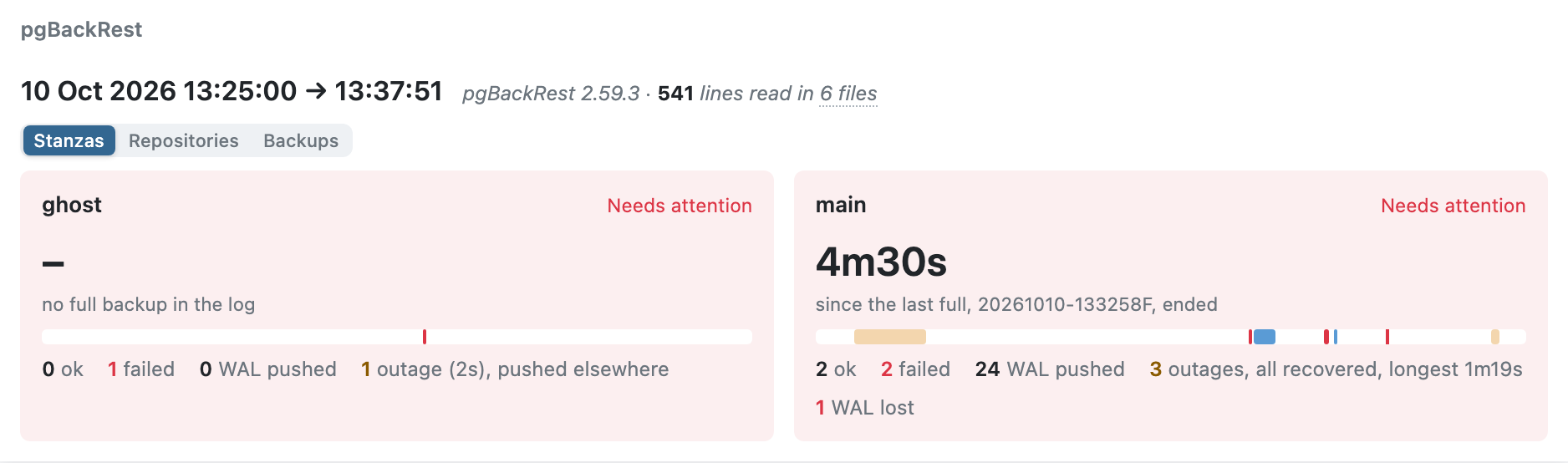
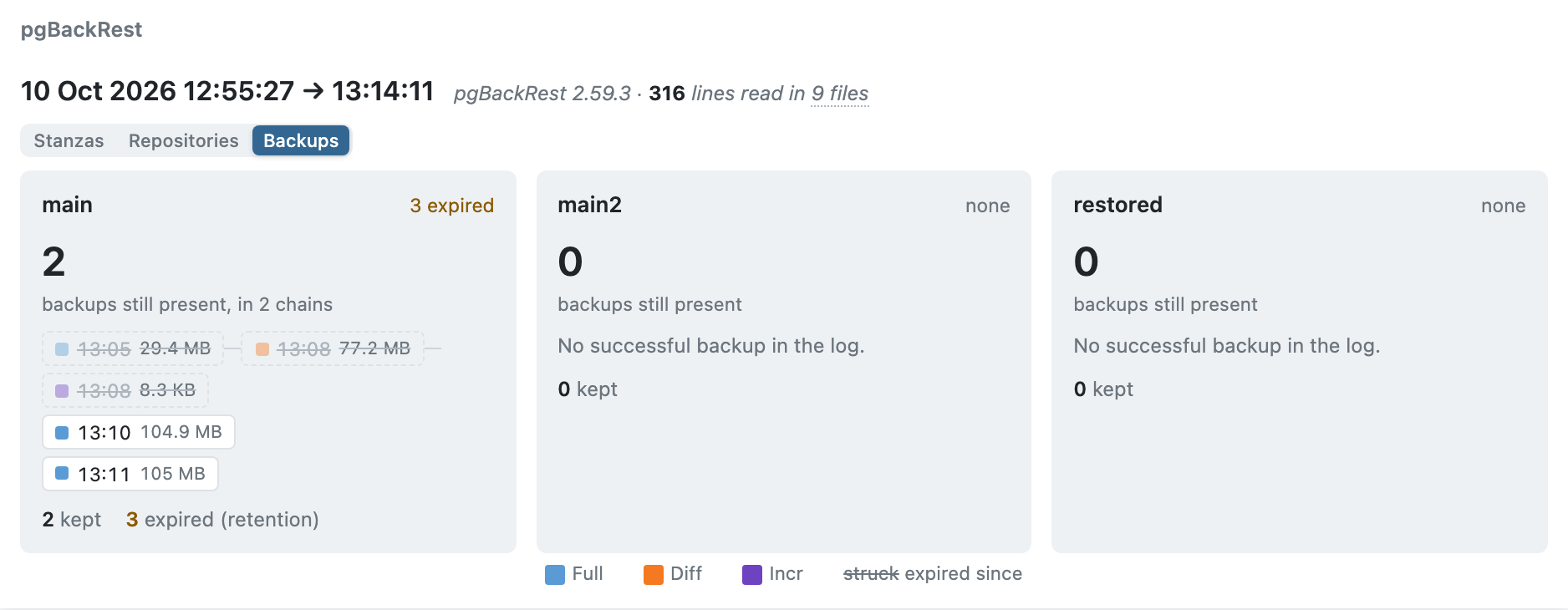
One card per stanza: its state, the age of the last full backup, a gauge of the period (backups, outages, WAL lost or missing) and its counts. The Repositories tab gives the same per repository; Backups the backups still present, each diff and incr chained to its full, the expired ones struck:
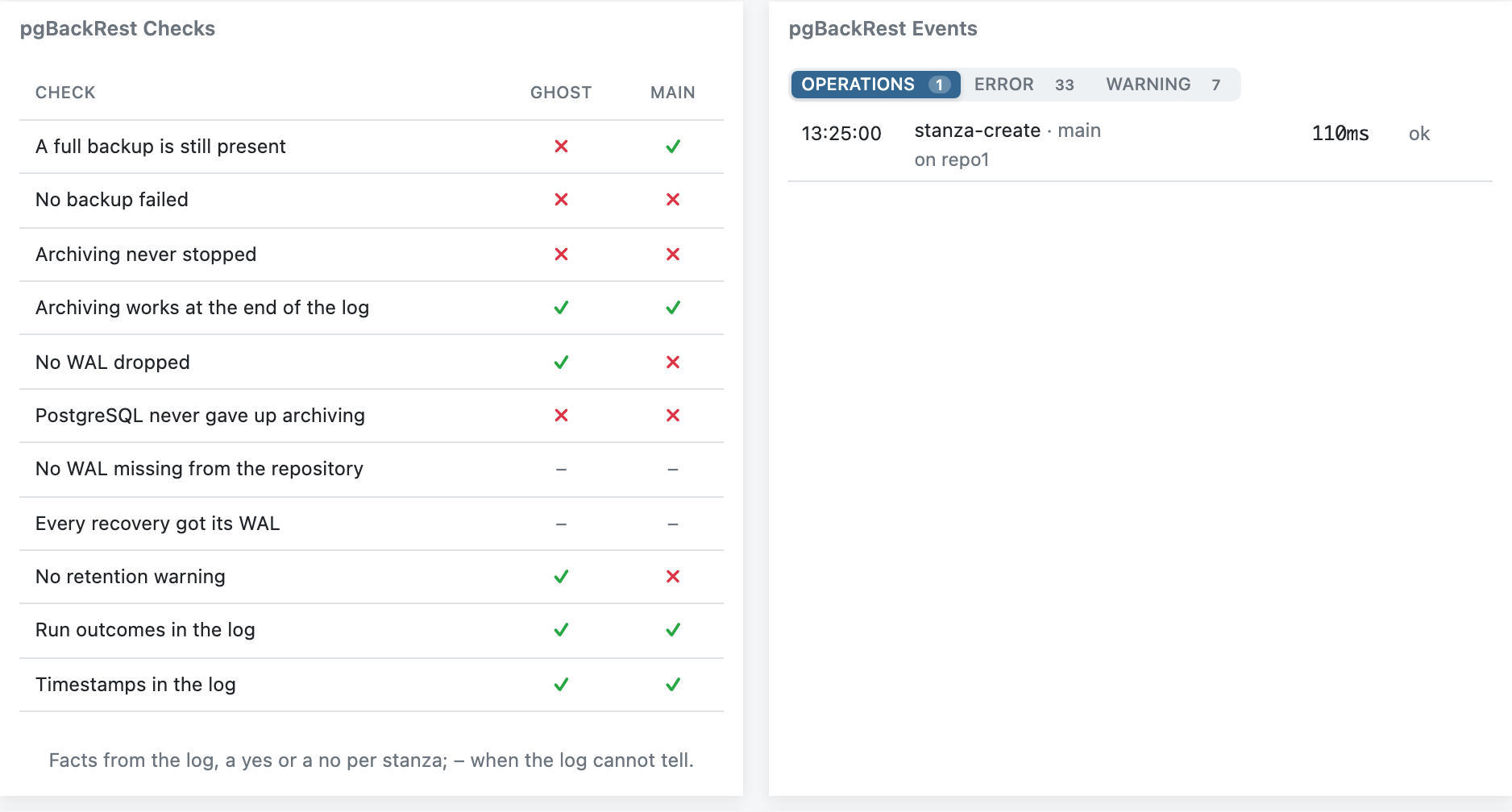
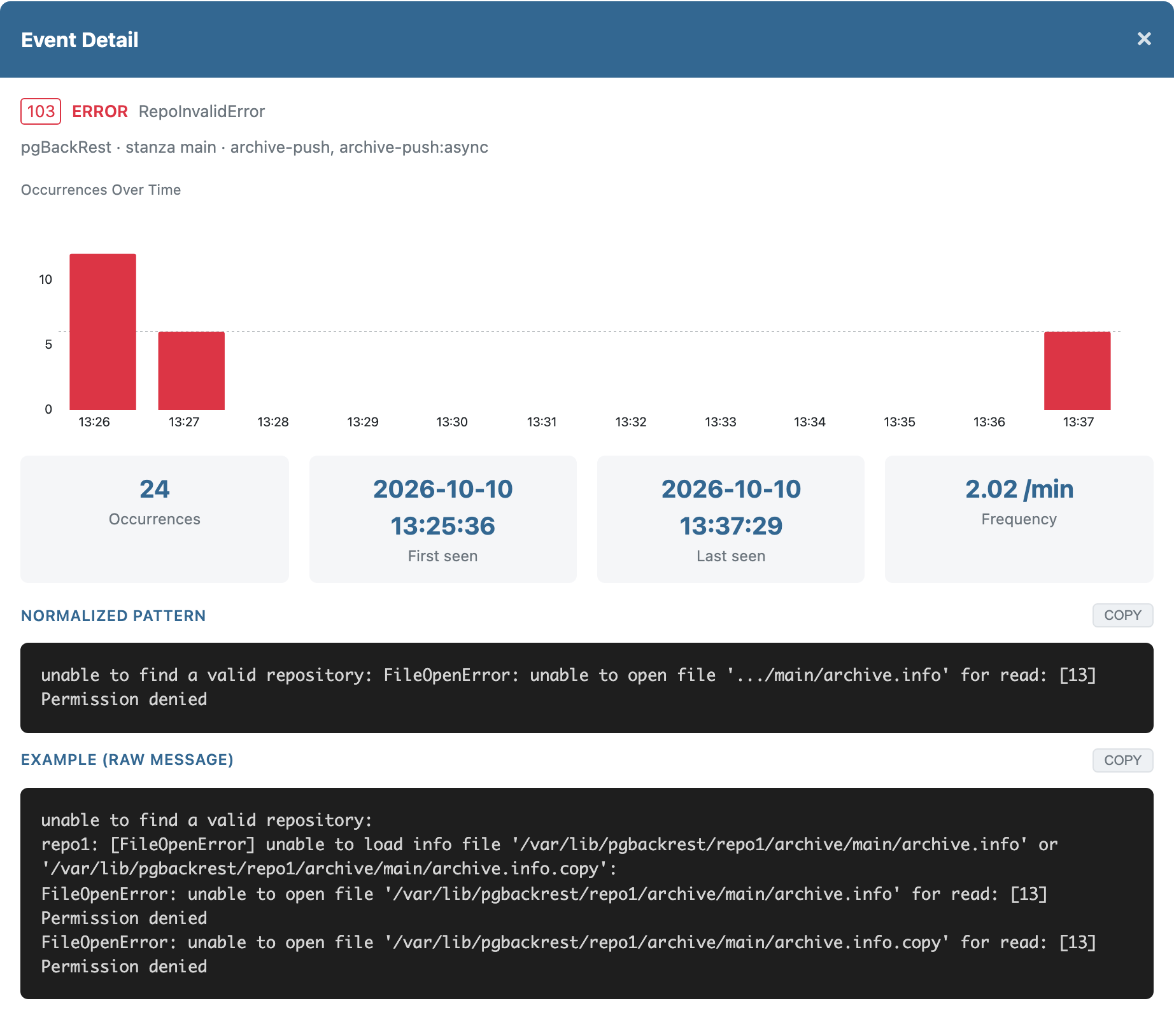
Checks answer yes or no per stanza, "–" when the log cannot tell. Events lists the other operations (restores with what stopped their recovery, check, stanza-create, stop, start…), then the errors and warnings; a click on one opens its detail, the HTML counterpart of --event-detail:
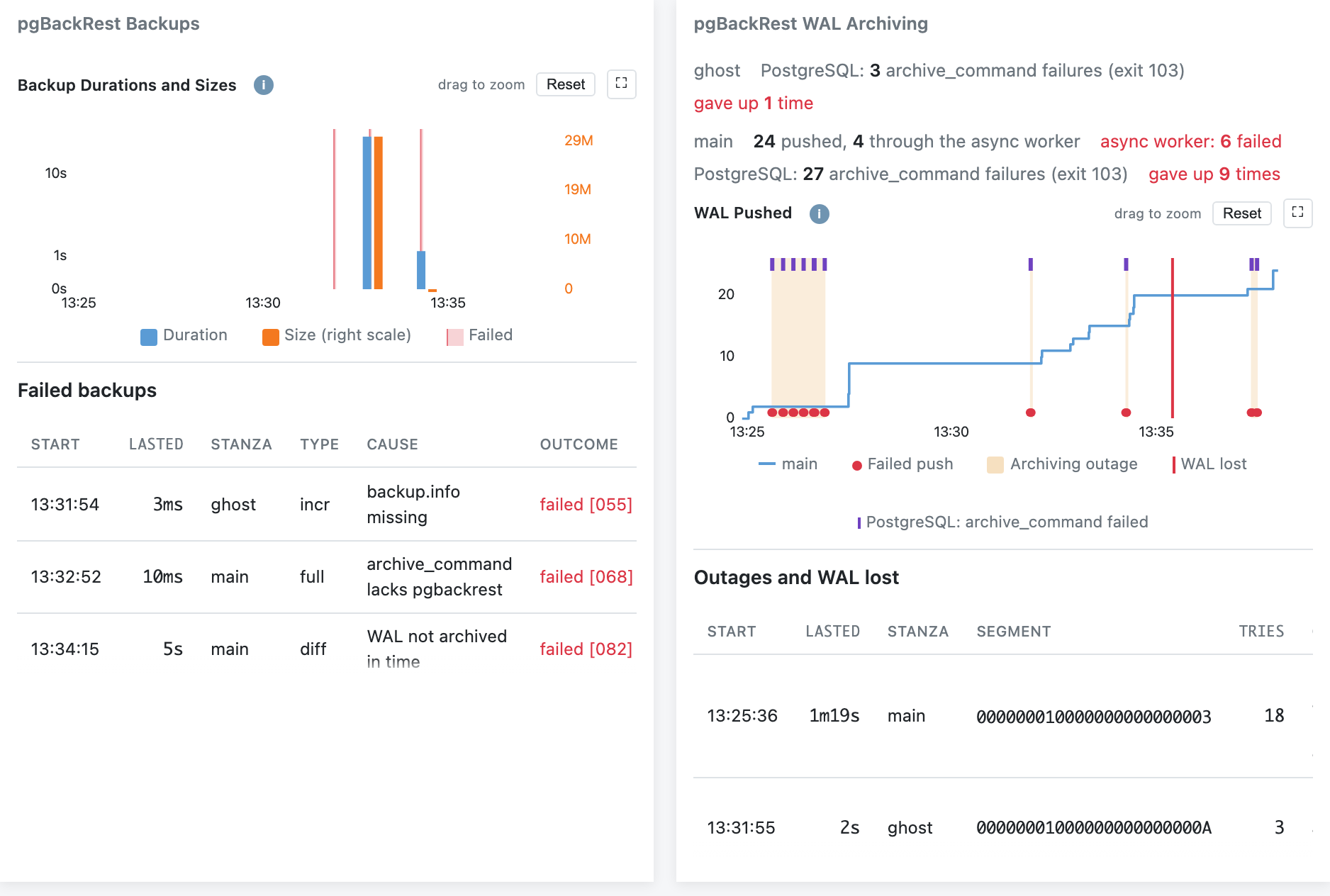
Backups: the duration (log scale) and size of each backup that succeeded; a failed or killed one is a band over the time it ran, listed under the chart. WAL: the segments pushed, cumulated per stanza; bands are outages, red lines WAL lost, red dots failed pushes, violet ticks PostgreSQL's archive_command failures. Above the chart, the async worker's share and PostgreSQL's own counts; under it, each outage with PostgreSQL's side.
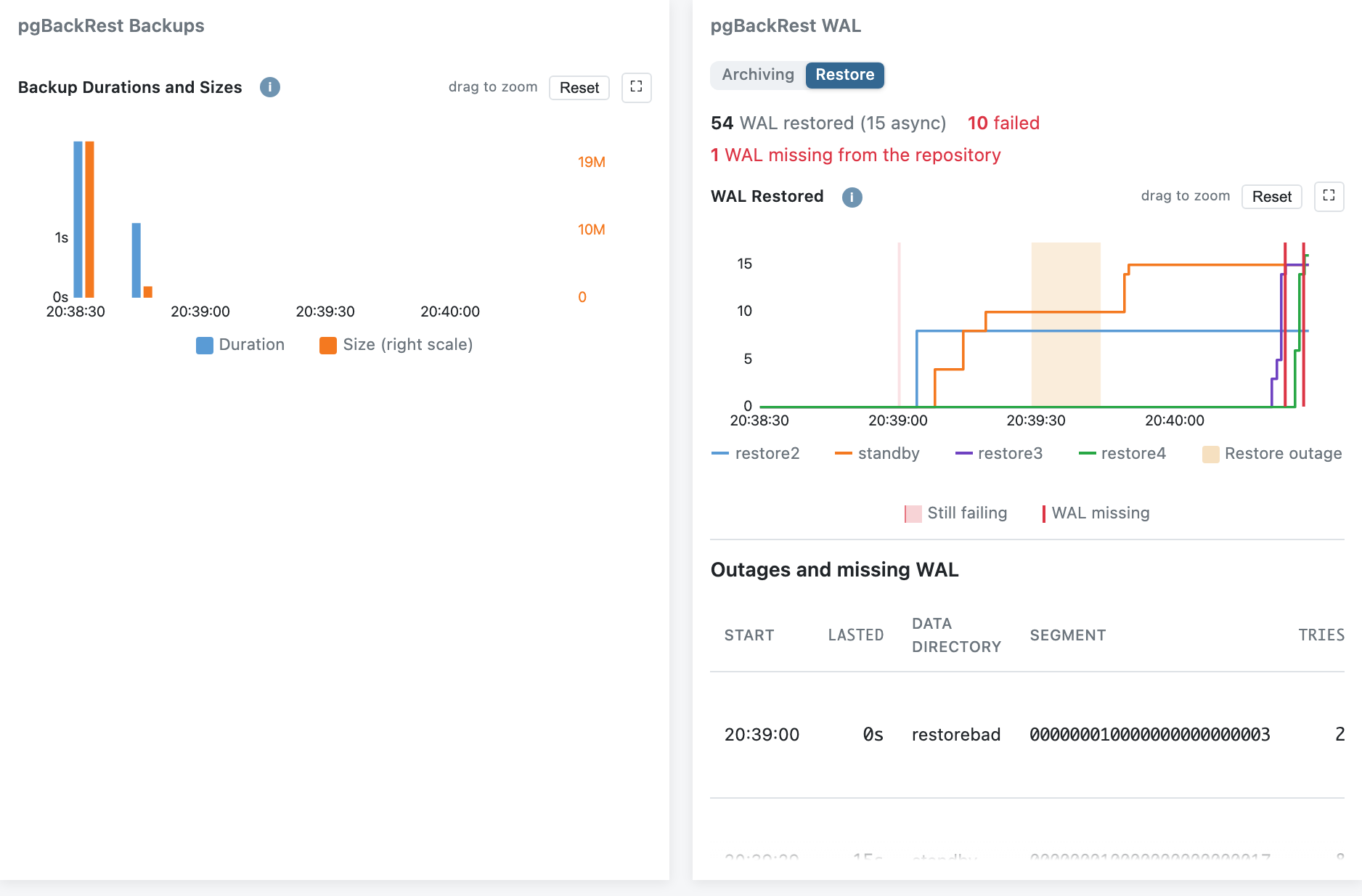
When archive-get is logged, a Restore tab shows the segments restored, cumulated per data directory (a restored instance, a standby), its outages, and the WAL missing from the repository.
Filters
--begin/--end(and--last,--window) restrict the pgBackRest report to the window, and it says so.--dbname,--dbuser,--exclude-user,--appnameand the section options (--summary,--sql-summary…) leave it out: pgBackRest has no database, user or application.--splitperiods are PostgreSQL's alone.
JSON
--json and --yaml add a top-level pgbackrest list, one entry per stanza. Its keys are described in the web data contract.